
THE GTA FEED GUIDE
GTA 6 storage requirements for PS5 and Xbox Series X|S
Set aside up to 212 GB of free space to install GTA 6, including if you pre-load it. PlayStation lists 212 GB for PS5. Rockstar says the requirement depends on the console, so check the Xbox install prompt for your system. Measure free space on the drive you plan to use.
Is GTA 6 a 212 GB download?
Rockstar gives up to 212 GB as the available space needed for pre-load and installation. The amount of data you download can differ from the space the console needs to install it. Use the console’s storage prompt for the amount required on your device.
A 512 GB Xbox Series S can run GTA 6 if there’s enough free space on a compatible drive. System files and installed games already take up some capacity. For example, if you have 180 GB free and the install needs 212 GB, free at least 32 GB more on that drive.
Official references: Rockstar Support: GTA VI installation requirements ↗ · Rockstar Support: GTA VI pre-load FAQ ↗ · PlayStation Support: GTA VI storage and pre-load ↗ · Xbox Store: Grand Theft Auto VI and console compatibility ↗
Which drives can run GTA 6?
Check the free space on one drive that can run the game. Two drives with 110 GB free each do not provide 220 GB to one installation. A USB drive can still help by storing games you want to move out of the way.
| Console | Play from | What USB storage can do |
|---|---|---|
| PS5 | Built-in SSD or a compatible M.2 SSD fitted in the console. | Store PS5 game files, then copy them back to the console SSD or M.2 SSD to play. |
| Xbox Series X or Series S | Built-in SSD or a compatible Storage Expansion Card for Xbox Series X|S. | Store optimized Xbox games for transfer back to a drive that can play them. |
Official references: PlayStation Support: manage PS5 storage ↗ · PlayStation Support: install and use a compatible M.2 SSD ↗ · Xbox Wire: Series X|S storage options ↗ · Xbox Store: Grand Theft Auto VI and console compatibility ↗
How to free up space for GTA 6 on PS5
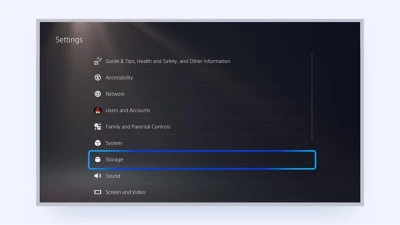
Start on the PS5 home screen. If you already have a compatible M.2 SSD installed, check its free space separately from the built-in storage.
- Open Settings → Storage and check the free space under Console Storage or M.2 SSD Storage.
- To uninstall games you can download again, open Games and Apps for that drive and select only the games you want to remove. Leave the separate Saved Data area alone.
- To keep another game’s installation, highlight it in Game Library, press Options, and choose Move Games and Apps. Move it to a compatible drive with room.
- If you want GTA 6 on the M.2 SSD, open Settings → Storage → Installation Location and choose M.2 SSD storage for PS5 games before starting the download.
Official references: PlayStation Support: GTA VI storage and pre-load ↗ · PlayStation Support: manage PS5 storage ↗ · PlayStation Support: install and use a compatible M.2 SSD ↗
How to free up space on Xbox Series X or Series S
The steps are the same on both Xbox models. Check the drive that will hold GTA 6 before making room.
- Open Settings → System → Storage devices. Check available space on the internal SSD or a compatible Storage Expansion Card.
- Move games you want to keep to another drive, or uninstall games you can reinstall later. Choose game installations when clearing space and leave saved data alone.
- With another drive connected, open Change installation locations in Storage devices. Choose the internal SSD or Storage Expansion Card for games optimized for Xbox Series X|S.
- Go back to the GTA VI installation and check the space shown there. If the queue says you need more room, check which drive the install is targeting before removing more games.
Official references: Xbox Wire: Series X|S storage options ↗ · Xbox Wire: choose a drive for game installations ↗ · Xbox Store: Grand Theft Auto VI and console compatibility ↗
Put the guide to use
Official sources
Sources checked . Use the linked publisher or platform instructions for current requirements and controls.
- Rockstar Support: GTA VI installation requirements ↗
- Rockstar Support: GTA VI pre-load FAQ ↗
- PlayStation Support: GTA VI storage and pre-load ↗
- PlayStation Support: manage PS5 storage ↗
- PlayStation Support: install and use a compatible M.2 SSD ↗
- Xbox Store: Grand Theft Auto VI and console compatibility ↗
- Xbox Wire: Series X|S storage options ↗
- Xbox Wire: choose a drive for game installations ↗